Create the VPC
Progress checklist
Overview
Section titled “Overview”A dedicated VPC with a public subnet in apse2-az1
Availability Zone ID — a unique, account-stable identifier such as apse2-az1. Directory bucket names and Express location config use the AZ ID, not the account-local AZ name (for example ap-southeast-2a)., an internet
gateway, and both gateway endpoints
VPC gateway endpoint for private S3 access without a NAT gateway. This lab creates both com.amazonaws.ap-southeast-2.s3 and com.amazonaws.ap-southeast-2.s3express. so the route table
reaches Standard (s3) and directory buckets (s3express).
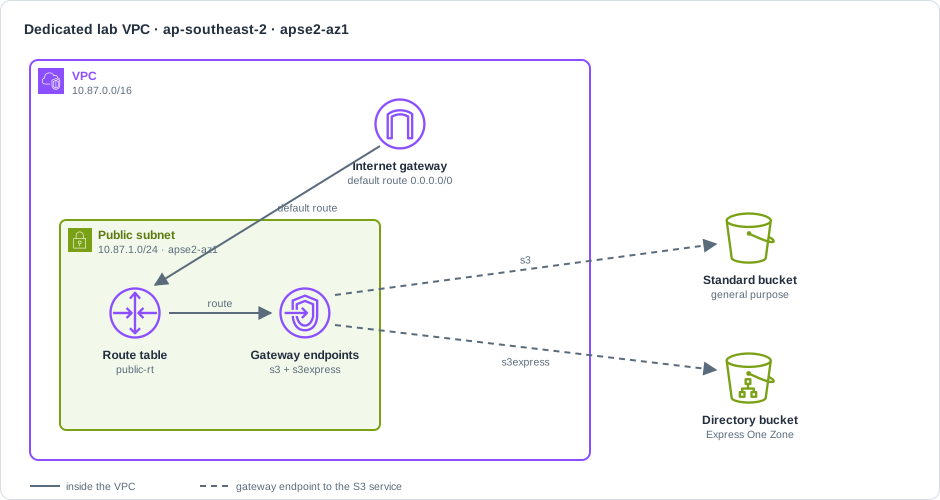
| Setting | Value |
|---|---|
| VPC CIDR | 10.87.0.0/16 |
| Public subnet | 10.87.1.0/24 in the AZ mapped from apse2-az1 |
| Endpoints | Gateway com.amazonaws.ap-southeast-2.s3 and com.amazonaws.ap-southeast-2.s3express |
| Tag | Project=s3-express-hot-lookup-walkthrough |
Prefer ./scripts/demo.sh up for the full stack (VPC through EC2). The steps below show the VPC
portion so you can see each call.
Reuse one LAB_SUFFIX for the whole run. Run commands from the repo root.
export AWS_PROFILE=sandboxexport AWS_REGION=ap-southeast-2export S3X_LAB_ALLOW_AWS=1export LAB_SUFFIX=${LAB_SUFFIX:-$(date +%Y%m%d%H%M%S)}export NAME_PREFIX="s3x-hotlookup-${LAB_SUFFIX}"mkdir -p .lab-
Resolve the account-local AZ name for AZ ID
apse2-az1.Terminal window export AZ_NAME=$(aws ec2 describe-availability-zones \--zone-ids apse2-az1 \--query 'AvailabilityZones[0].ZoneName' \--output text)echo "apse2-az1 maps to ${AZ_NAME}"Looks like (mapping varies per account; verified in this lab →
ap-southeast-2b):apse2-az1 maps to ap-southeast-2b -
Create the VPC.
Terminal window export VPC_ID=$(aws ec2 create-vpc \--cidr-block 10.87.0.0/16 \--tag-specifications "ResourceType=vpc,Tags=[{Key=Name,Value=${NAME_PREFIX}-vpc},{Key=Project,Value=s3-express-hot-lookup-walkthrough}]" \--query 'Vpc.VpcId' --output text)echo "$VPC_ID"Looks like (verified shape; ID is unique per run):
vpc-00d6aa4fcb0186b18 -
Enable DNS support on the VPC.
Terminal window aws ec2 modify-vpc-attribute --vpc-id "$VPC_ID" --enable-dns-support '{"Value":true}'Looks like: no stdout on success (exit 0).
-
Enable DNS hostnames on the VPC.
Terminal window aws ec2 modify-vpc-attribute --vpc-id "$VPC_ID" --enable-dns-hostnames '{"Value":true}'Looks like: no stdout on success (exit 0).
-
Create the public subnet in
$AZ_NAME.Terminal window export SUBNET_ID=$(aws ec2 create-subnet \--vpc-id "$VPC_ID" \--cidr-block 10.87.1.0/24 \--availability-zone "$AZ_NAME" \--tag-specifications "ResourceType=subnet,Tags=[{Key=Name,Value=${NAME_PREFIX}-public},{Key=Project,Value=s3-express-hot-lookup-walkthrough}]" \--query 'Subnet.SubnetId' --output text)echo "$SUBNET_ID"Looks like (verified shape):
subnet-0cd48670008b610ed -
Map public IPs on launch for that subnet.
Terminal window aws ec2 modify-subnet-attribute --subnet-id "$SUBNET_ID" --map-public-ip-on-launchLooks like: no stdout on success (exit 0).
-
Create an internet gateway.
Terminal window export IGW_ID=$(aws ec2 create-internet-gateway \--tag-specifications "ResourceType=internet-gateway,Tags=[{Key=Name,Value=${NAME_PREFIX}-igw},{Key=Project,Value=s3-express-hot-lookup-walkthrough}]" \--query 'InternetGateway.InternetGatewayId' --output text)echo "$IGW_ID"Looks like (verified shape):
igw-0676b3eda3d0ef0c4 -
Attach the internet gateway to the VPC.
Terminal window aws ec2 attach-internet-gateway --vpc-id "$VPC_ID" --internet-gateway-id "$IGW_ID"Looks like: no stdout on success (exit 0).
-
Create a route table for the public subnet.
Terminal window export RTB_ID=$(aws ec2 create-route-table \--vpc-id "$VPC_ID" \--tag-specifications "ResourceType=route-table,Tags=[{Key=Name,Value=${NAME_PREFIX}-public-rt},{Key=Project,Value=s3-express-hot-lookup-walkthrough}]" \--query 'RouteTable.RouteTableId' --output text)echo "$RTB_ID"Looks like (verified shape):
rtb-092b1349417c3da09
Public route and gateway endpoints
Section titled “Public route and gateway endpoints”-
Add the default route via the internet gateway.
Terminal window aws ec2 create-route --route-table-id "$RTB_ID" --destination-cidr-block 0.0.0.0/0 \--gateway-id "$IGW_ID"Looks like:
{"Return": true} -
Associate the route table with the public subnet.
Terminal window aws ec2 associate-route-table --route-table-id "$RTB_ID" --subnet-id "$SUBNET_ID"Looks like (shape; association ID varies):
{"AssociationId": "rtbassoc-0a1b2c3d4e5f67890","AssociationState": {"State": "associated"}} -
Create the Gateway VPC endpoint for general-purpose S3.
Terminal window export VPCE_S3_ID=$(aws ec2 create-vpc-endpoint \--vpc-id "$VPC_ID" \--vpc-endpoint-type Gateway \--service-name com.amazonaws.ap-southeast-2.s3 \--route-table-ids "$RTB_ID" \--tag-specifications "ResourceType=vpc-endpoint,Tags=[{Key=Name,Value=${NAME_PREFIX}-vpce-s3},{Key=Project,Value=s3-express-hot-lookup-walkthrough}]" \--query 'VpcEndpoint.VpcEndpointId' --output text)echo "$VPCE_S3_ID"Looks like (verified shape):
vpce-0239294790f18dab2 -
Create the Gateway VPC endpoint for S3 Express (directory buckets).
Terminal window export VPCE_S3EXPRESS_ID=$(aws ec2 create-vpc-endpoint \--vpc-id "$VPC_ID" \--vpc-endpoint-type Gateway \--service-name com.amazonaws.ap-southeast-2.s3express \--route-table-ids "$RTB_ID" \--tag-specifications "ResourceType=vpc-endpoint,Tags=[{Key=Name,Value=${NAME_PREFIX}-vpce-s3express},{Key=Project,Value=s3-express-hot-lookup-walkthrough}]" \--query 'VpcEndpoint.VpcEndpointId' --output text)echo "$VPCE_S3EXPRESS_ID"Looks like (verified shape):
vpce-0bc1806661cdbf46f
Prefer the wrapper
Section titled “Prefer the wrapper”demo.sh up creates this VPC networking plus security group, buckets, IAM, and EC2 (it requires
the harness image from Build harness image):
export S3X_LAB_ALLOW_AWS=1./scripts/demo.sh upVerify
Section titled “Verify”aws ec2 describe-vpcs --vpc-ids "$VPC_ID" \ --query 'Vpcs[0].{Cidr:CidrBlock,Tags:Tags}'aws ec2 describe-subnets --subnet-ids "$SUBNET_ID" \ --query 'Subnets[0].{Az:AvailabilityZone,Cidr:CidrBlock}'aws ec2 describe-vpc-endpoints \ --filters "Name=vpc-id,Values=${VPC_ID}" \ --query 'VpcEndpoints[].{Service:ServiceName,State:State,Type:VpcEndpointType}'Looks like (verified; subnet AZ is account-local):
[ { "Service": "com.amazonaws.ap-southeast-2.s3", "State": "available", "Type": "Gateway" }, { "Service": "com.amazonaws.ap-southeast-2.s3express", "State": "available", "Type": "Gateway" }]| Check | Expect |
|---|---|
| CIDR | 10.87.0.0/16 |
| Subnet AZ | Matches apse2-az1 mapping (ap-southeast-2b in this lab) |
| Endpoints | Both …s3 and …s3express, type Gateway, state available |
Continue to Create the buckets.