Seed and run harness
Progress checklist
Overview
Section titled “Overview”Seed identical hot keys into both buckets, then the harness
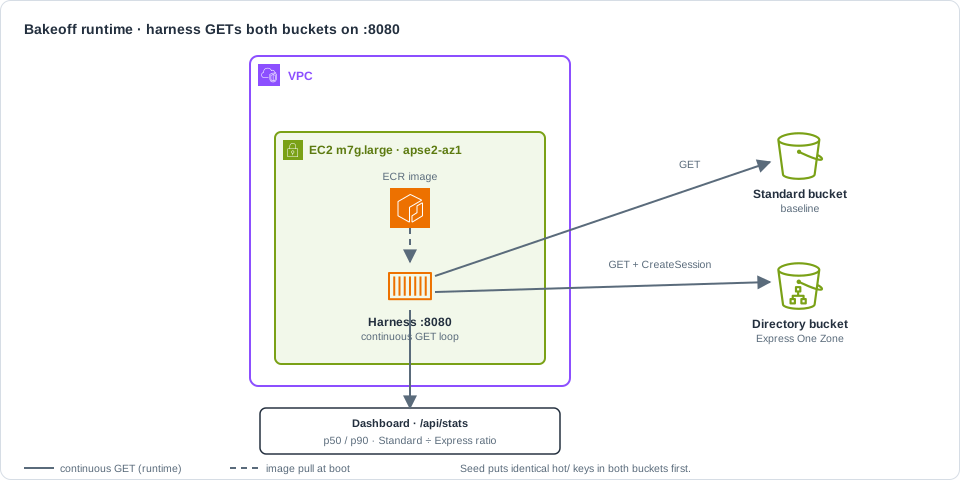
Docker container on the lab EC2 instance that continuously GETs the same keys from Express and Standard, exposes a dashboard on :8080, and reports p50/p90 latency ratios. container
(pulled from ECR by EC2 user-data) issues continuous GETs to each — plain GET to Standard,
GET + CreateSession
s3express:CreateSession — session-based auth for zonal (object-level) operations on a directory bucket. The SDK or CLI obtains temporary credentials scoped to that bucket before GET/PUT/LIST. to the directory bucket — and serves
the dashboard on port 8080.
| Setting | Default |
|---|---|
| Object count | 64 |
| Object size | 16384 bytes |
| Prefix | hot/ (keys hot/obj-0000.bin …) |
| Port | 8080 |
demo.sh up already seeds once. Use seed to re-upload. Use harness for rebuild / re-pull
guidance — it does not build on the instance.
Run from the repo root with lab state present (.lab-state.json from demo.sh up).
export AWS_PROFILE=sandboxexport AWS_REGION=ap-southeast-2export S3X_LAB_ALLOW_AWS=1-
Reseed identical keys into Standard and Express (skip if you just ran
demo.sh up).Terminal window ./scripts/demo.sh seedLooks like (verified):
Uploading 64 objects (16384 bytes) to Standard and Express…Seeded 64 keys under hot/ on both buckets. -
Confirm object counts on both buckets.
Terminal window STD=$(jq -r .standardBucket .lab-state.json)EXP=$(jq -r .expressBucket .lab-state.json)aws s3api list-objects-v2 --bucket "$STD" --prefix hot/ \--query 'length(Contents)' --output textaws s3api list-objects-v2 --bucket "$EXP" --prefix hot/ \--query 'length(Contents)' --output textLooks like (verified):
6464 -
Confirm the harness is healthy (bootstrap pulls from ECR; wait a few minutes after
up).Terminal window ./scripts/demo.sh statusLooks like (verified shape; IDs and IP are yours):
region=ap-southeast-2 profile=sandbox suffix=EXAMPLE…standard-objects=64 express-objects=64harness-healthz=200 (http://203.0.113.10:8080/) -
Hit
/healthzdirectly.Terminal window curl -sS "http://$(jq -r .publicIp .lab-state.json):8080/healthz"Looks like (verified):
{"ok":true} -
Optional — rebuild the image and print re-pull guidance (does not restart the container by itself).
Terminal window ./scripts/image.sh build./scripts/demo.sh harnessLooks like (
harnessguidance; image tag is your git short SHA):Harness images are built by CodeBuild into ECR (not on the lab EC2).Rebuild and push:export S3X_LAB_ALLOW_AWS=1./scripts/image.sh buildThen either:- Re-run ./scripts/demo.sh up with a new LAB_SUFFIX …, or- On the instance: docker pull …/s3x-hotlookup-harness:c3cad1d && docker restart s3x-harnessCurrent lab image: 123456789012.dkr.ecr.ap-southeast-2.amazonaws.com/s3x-hotlookup-harness:c3cad1dDashboard: http://203.0.113.10:8080/
Verify
Section titled “Verify”./scripts/demo.sh statuscurl -sS "http://$(jq -r .publicIp .lab-state.json):8080/healthz"curl -sS "http://$(jq -r .publicIp .lab-state.json):8080/api/stats" | jq '{ object_count, object_prefix, express: .express|{count,errors,p50_ms,p90_ms}, standard: .standard|{count,errors,p50_ms,p90_ms}, standard_over_express_p50}'Looks like (verified shape; latencies vary — use ratios, not absolute ms, in claims):
{ "object_count": 64, "object_prefix": "hot/", "express": { "count": 3536, "errors": 0, "p50_ms": 6.173, "p90_ms": 6.553 }, "standard": { "count": 3536, "errors": 0, "p50_ms": 25.105, "p90_ms": 28.109 }, "standard_over_express_p50": 4.07}| Check | Expect |
|---|---|
| Object counts | 64 on both buckets under hot/ |
harness-healthz | 200 |
/healthz | {"ok":true} |
/api/stats errors | 0 on both sides after warm-up |
| Sample counts | Climbing while the harness runs |
Continue to Read the dashboard.