Create the buckets
Progress checklist
Overview
Section titled “Overview”Two buckets in ap-southeast-2 — a Standard general-purpose bucket (baseline) and a
directory-bucket
S3 bucket type that hosts the S3 Express One Zone storage class. Names follow bucket-base-name--zone-id--x-s3 and live in a single Availability Zone. for S3 Express One Zone
Amazon S3 Express One Zone — single-AZ storage class optimized for consistent single-digit millisecond latency, used only with directory buckets.
S3 Express One Zone.
Directory names follow bucket-base-name--zone-id--x-s3; this lab uses AZ ID apse2-az1 only.
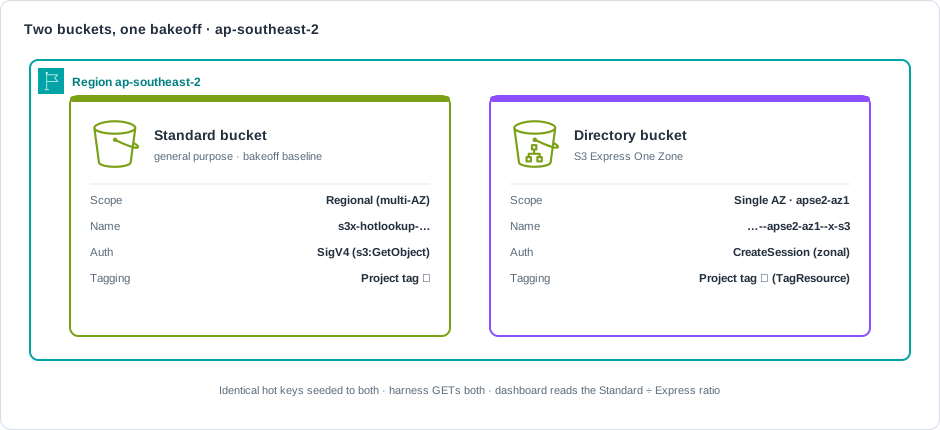
| Bucket | Naming |
|---|---|
| Standard | s3x-hotlookup-${LAB_SUFFIX}-${ACCOUNT_ID} |
| Directory | s3x-hotlookup-${LAB_SUFFIX}--apse2-az1--x-s3 |
Reuse the same LAB_SUFFIX as the VPC. Run from the repo root.
export AWS_PROFILE=sandboxexport AWS_REGION=ap-southeast-2export S3X_LAB_ALLOW_AWS=1export LAB_SUFFIX=${LAB_SUFFIX:-$(date +%Y%m%d%H%M%S)}export ACCOUNT_ID=$(aws sts get-caller-identity --query Account --output text)export STD_BUCKET="s3x-hotlookup-${LAB_SUFFIX}-${ACCOUNT_ID}"export DIR_BUCKET="s3x-hotlookup-${LAB_SUFFIX}--apse2-az1--x-s3"echo "STD_BUCKET=${STD_BUCKET}"echo "DIR_BUCKET=${DIR_BUCKET}"Looks like (verified shape; suffix and account are yours):
STD_BUCKET=s3x-hotlookup-EXAMPLE-123456789012DIR_BUCKET=s3x-hotlookup-EXAMPLE--apse2-az1--x-s3-
Create the Standard general-purpose bucket.
Terminal window aws s3api create-bucket \--bucket "$STD_BUCKET" \--create-bucket-configuration "LocationConstraint=${AWS_REGION}"Looks like (verified shape):
{"Location": "<standard regional endpoint URL for STD_BUCKET>","BucketArn": "arn:aws:s3:::s3x-hotlookup-EXAMPLE-123456789012"} -
Tag the Standard bucket with the lab Project tag.
Terminal window aws s3api put-bucket-tagging \--bucket "$STD_BUCKET" \--tagging 'TagSet=[{Key=Project,Value=s3-express-hot-lookup-walkthrough}]'Looks like: no stdout on success (exit 0).
-
Create the directory bucket with
Location Type=AvailabilityZone.Terminal window aws s3api create-bucket \--bucket "$DIR_BUCKET" \--create-bucket-configuration '{"Location": {"Type": "AvailabilityZone","Name": "apse2-az1"},"Bucket": {"DataRedundancy": "SingleAvailabilityZone","Type": "Directory"}}' \--region "$AWS_REGION"Looks like (verified shape):
{"Location": "<zonal Express endpoint URL for DIR_BUCKET>","BucketArn": "arn:aws:s3express:ap-southeast-2:123456789012:bucket/s3x-hotlookup-EXAMPLE--apse2-az1--x-s3"} -
Tag the directory bucket (S3 Control
TagResource— classicput-bucket-taggingis not supported on directory buckets).Terminal window aws s3control tag-resource \--account-id "$ACCOUNT_ID" \--resource-arn "arn:aws:s3express:${AWS_REGION}:${ACCOUNT_ID}:bucket/${DIR_BUCKET}" \--tags Key=Project,Value=s3-express-hot-lookup-walkthroughLooks like: no stdout on success (exit 0).
Prefer the wrapper
Section titled “Prefer the wrapper”demo.sh up creates both buckets (plus VPC, IAM, and EC2) after the harness image from
Build harness image:
export S3X_LAB_ALLOW_AWS=1./scripts/demo.sh upVerify
Section titled “Verify”-
Standard bucket location and tags.
Terminal window aws s3api get-bucket-location --bucket "$STD_BUCKET"aws s3api get-bucket-tagging --bucket "$STD_BUCKET"Looks like (verified):
{"LocationConstraint": "ap-southeast-2"}{"TagSet": [{"Key": "Project","Value": "s3-express-hot-lookup-walkthrough"}]} -
Directory bucket head and tags.
Terminal window aws s3api head-bucket --bucket "$DIR_BUCKET"aws s3control list-tags-for-resource \--account-id "$ACCOUNT_ID" \--resource-arn "arn:aws:s3express:${AWS_REGION}:${ACCOUNT_ID}:bucket/${DIR_BUCKET}"Looks like (verified shape):
{"BucketArn": "arn:aws:s3express:ap-southeast-2:123456789012:bucket/s3x-hotlookup-EXAMPLE--apse2-az1--x-s3","BucketLocationType": "AvailabilityZone","BucketLocationName": "apse2-az1","BucketRegion": "ap-southeast-2","AccessPointAlias": false}{"Tags": [{"Key": "Project","Value": "s3-express-hot-lookup-walkthrough"}]} -
Print ARNs.
Terminal window echo "arn:aws:s3:::${STD_BUCKET}"echo "arn:aws:s3express:${AWS_REGION}:${ACCOUNT_ID}:bucket/${DIR_BUCKET}"Looks like (verified shape):
arn:aws:s3:::s3x-hotlookup-EXAMPLE-123456789012arn:aws:s3express:ap-southeast-2:123456789012:bucket/s3x-hotlookup-EXAMPLE--apse2-az1--x-s3
| Check | Expect |
|---|---|
| Standard location | ap-southeast-2 |
| Directory name | ends with --apse2-az1--x-s3 |
| Directory location | AvailabilityZone / apse2-az1 |
| Tag (Standard) | s3api get-bucket-tagging → Project=… |
| Tag (directory) | s3control list-tags-for-resource → Project=… |
Continue to IAM and EC2.